
Essential Linux Commands and Concepts Every DevOps Engineer Needs to Master
2/6/2026
In the world of DevOps, Linux isn't just another skill—it's the foundation of everything you do. Most servers, cloud environments, containers, automation tools, and even CI/CD pipelines are deeply rooted in Linux systems. Whether you're managing infrastructure, deploying code, or troubleshooting production issues, a strong Linux foundation is non-negotiable for DevOps success.
Why Linux Is Essential for DevOps
Linux has become the engine of modern DevOps workflows. From running virtual machines in cloud services to powering container platforms like Docker and Kubernetes, Linux underpins nearly every component of a DevOps environment.
Here's why Linux matters:
- Most servers and cloud instances run on Linux, not Windows.
- DevOps tools are designed best for Linux environments.
- Linux offers stability, security, flexibility, and scripting power—all crucial for automation and scaling.
Because of this, DevOps engineers must know the basics and beyond to be effective.
1. Understanding the Linux File System
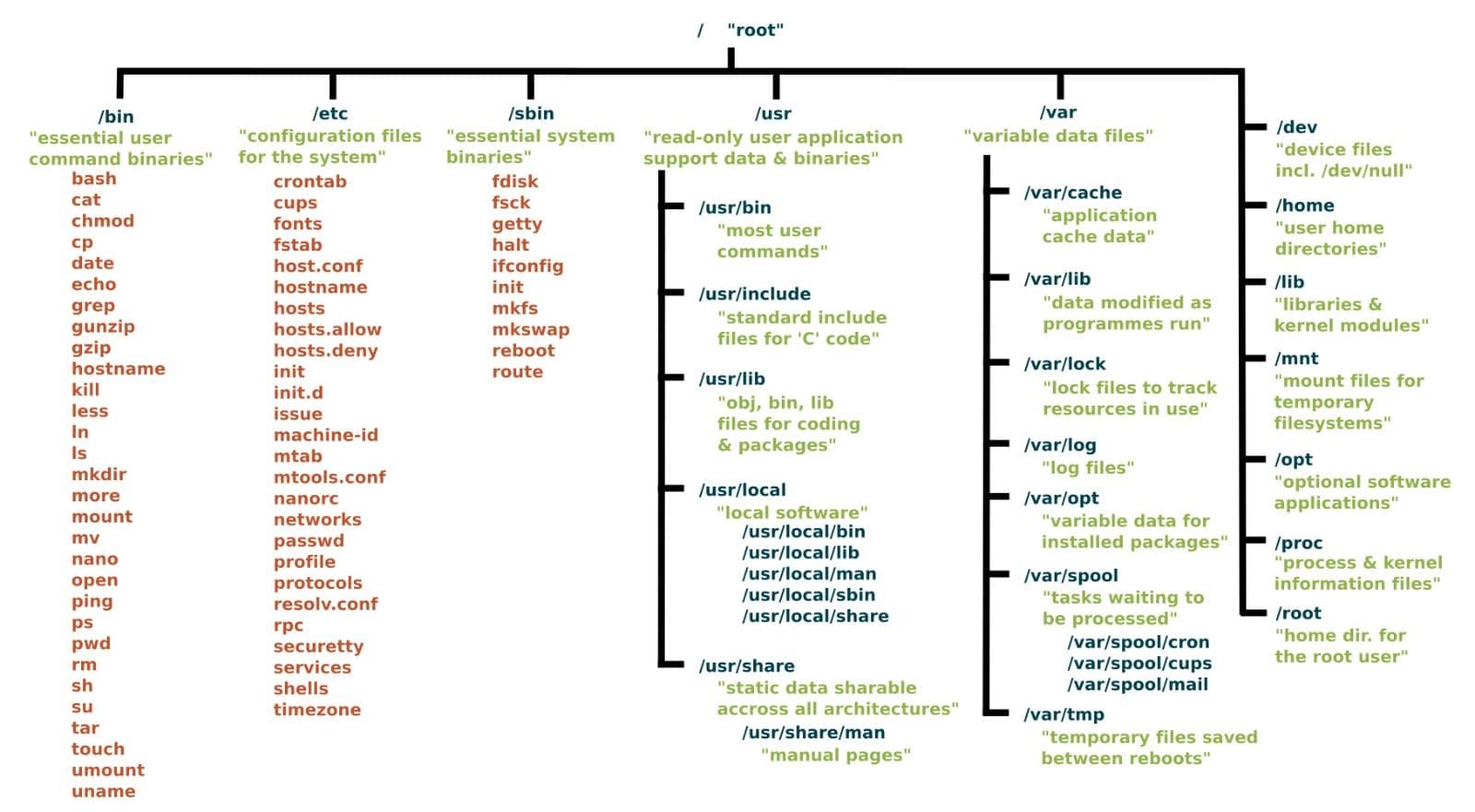
Linux organizes files and directories differently from Windows. Knowing the structure helps you navigate, configure services, and troubleshoot.
- /etc/ – Configuration files
- /var/log/ – Log files
- /home/ – User directories
- /usr/bin, /usr/sbin – System and user binaries
This foundation helps you locate config files, logs, and binaries quickly—a key skill when debugging issues.
2. Command Line Basics
The Linux terminal is where DevOps engineers spend most of their time. You'll use it for everything from inspecting files to automating tasks.
Here are essential commands:
- ls, cd, pwd – Navigate directories
- mkdir, rm, cp, mv – File management
- cat, less, head, tail – View file contents
- chmod, chown – Manage permissions & ownership
Being fluent with these commands makes everyday tasks faster and reduces reliance on GUIs or manual processes.
3. Managing Processes and System Resources
Monitoring system performance and managing processes are core DevOps responsibilities.
Useful commands include:
- top – Real-time system resource usage
- ps – List running processes
- kill – Terminate a process
- df -h – Check disk space
These help you solve problems like high CPU usage or out-of-disk errors on live servers.
4. Users, Permissions & Security
Linux has a robust permissions model which protects systems from unauthorized access.
Key concepts:
- File permissions (rwx for owner, group, others)
- sudo for elevated command execution
- User and group management (useradd, usermod)
Understanding this is crucial when managing production systems and enforcing security best practices.
5. Networking and Shell Scripting Basics
DevOps often requires you to connect to remote servers, work with network tools, and automate tasks.
- SSH (Secure Shell) – Connect to remote Linux servers securely.
- Shell scripting – Automate repetitive tasks
- Networking tools like ping, curl, ss help debug services and endpoints.
Scripting in Bash lets you automate deployments, health checks, backups, and more—saving time and reducing errors.
Final Thoughts
Linux mastery isn't just about memorizing commands—it's about understanding how systems work, how they communicate, and how you can automate and scale workflows reliably. For any DevOps engineer, this foundation translates directly into career opportunities, faster troubleshooting, and powerful automation capabilities.
Ready to Build High-Demand DevOps Skills?
Follow Eduwise Solutions to learn the most sought-after courses in DevOps, Linux, Cloud, and more—and accelerate your career with real-world training from professionals.